Today in Grok

Friday, 13 November 2026

TL;DR

1Highlight: Grok Bot on Mac can now use Messages, Mail, Notes, Reminders, Calendar, Location and Contacts.

2You switch on each Apple app separately; add an Ask first rule before letting it send texts or email.

3Grok Bot's Matt Palmer explains approval rules and Secure Forms; keep rules narrow and passwords out of chat.

Highlight of the day
Grok Bot on Mac can now use Messages, Mail, Notes and CalendarGrok Bot update
7
Apple apps and services Grok Bot on Mac can now use
Merged from 4 sources
★ Highlight of the day

Grok Bot on Mac can now use Messages, Mail, Notes and Calendar

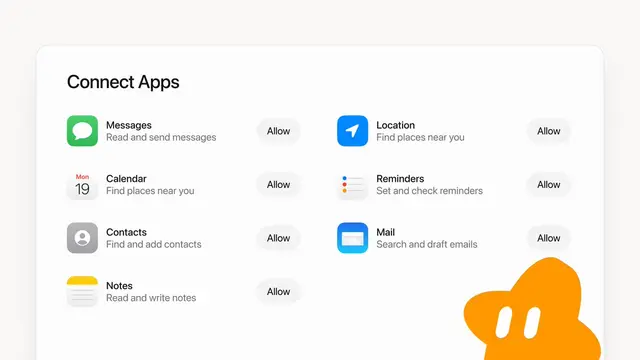
Grok Bot An AI teammate from SpaceXAI that has its own computer, connects to your apps, and can keep working on tasks for you.'s official X account said at 02:28 MYT on 13 November that the Mac app can now use Messages, Mail, Notes, Reminders, Calendar, Location and Contacts. The live Changelog A dated list of what changed in each new version of an app, published by the company that makes it.'s newest entry is still version 1.0.1 from 11 November, so it does not list this yet.

What we learned

  1. Appleosophy reports that you switch on each app separately from a new Connect Apps screen. Once an app is enabled, the Bot can read and send messages, search and draft emails, read and write notes, and set and check reminders for you.
  2. The @bot post gives no details on requirements or which plans get it. 9to5Mac notes that ChatGPT added a Messages integration earlier this year, so Apple-app access is becoming standard for AI assistants.
  3. Grok Bot's help pages say Auto Review Grok Bot's built-in checker that looks at each action a Bot is about to take and either lets it run or asks you first. checks each action before it runs, and an Ask first rule always brings up an Approval card A message in Grok Bot's chat that shows an action the Bot wants to take and waits for you to allow or deny it.. That matters more now that a Bot can send texts and emails from your Mac.

Why it matters: If you work in Apple's own apps, your Bot can now handle reminders, notes and replies where you already are. Connect only the apps you need, and add an Ask first rule for sending Messages and Mail.

Share this story

Sources (4)
  • Grok Bot on Mac can now use Messages, Mail, Notes, Reminders, Calendar, Location, and Contacts. · @bot on XRead ↗
  • Grok Bot for Mac adds integration with Apple Mail, Messages, Notes, and more · 9to5MacRead ↗
  • Grok Bot for Mac Can Now Work With Messages, Mail, Notes and More · AppleosophyRead ↗
  • Approvals, security, and privacy · Grok Bot docsRead ↗
More stories today
Grok Bot's Matt Palmer explains how approval rules keep you in chargeHow to use Grok Bot
20
maximum Ask first rules per person, per Grok Bot help pages
Merged from 2 sources
How to use Grok Bot

Grok Bot's Matt Palmer explains how approval rules keep you in charge

In a video posted on 13 November (MYT), Matt Palmer, who introduces himself as working at SpaceXSI, the company behind Grok Bot An AI teammate from SpaceXAI that has its own computer, connects to your apps, and can keep working on tasks for you., explains how the Bot decides when to ask permission and how it handles passwords. He calls himself a sceptic who has come to trust it, so treat this as an insider's view.

Key learnings

  • Permission settings have two lists: one for actions you always want to approve, such as replying to emails, posting on X or messaging teammates on Slack, and one for Routine A saved instruction that runs on a schedule or when something happens, even when you are away. actions you allow without asking. A separate reviewer checks each action against these rules and either stops it for your OK or lets it run.
  • The rules are written in plain English, not code, so Palmer says to be very specific. He admits one rule of his was too loose and let the Bot message a coworker on Slack without asking.
  • Passwords and card details go through Secure Form A Grok Bot form for typing a password or card number that fills it into a web page without the AI model seeing it. or a Password manager An app such as 1Password that stores your passwords safely and fills them in for you. such as 1Password. Grok Bot's help pages say these values are filled into the web page without being shown to the AI model, which limits what a hijacked Bot could leak.
  • The help pages add that if an Allow rule and an Ask first rule both match, Ask first wins, and that Auto Review Grok Bot's built-in checker that looks at each action a Bot is about to take and either lets it run or asks you first. is model-based, so it should complement careful Permissions A Settings section where you choose which bot actions always ask you first and which can run without asking. rather than replace them.

Why it matters: The safest setup is narrow: start with Ask first for sending, buying and deleting, and loosen rules one at a time. Never type a password into the ordinary chat.

Share this story

Sources (2)
  • Trusting Grok Bot · Matt Palmer (@mattpalmer)Watch ↗
  • Approvals, security, and privacy · Grok Bot docsRead ↗