 How to use Grok Bot
3
things it does: answers, links its sources, draws diagrams
Merged from 3 sources
★ Highlight of the day
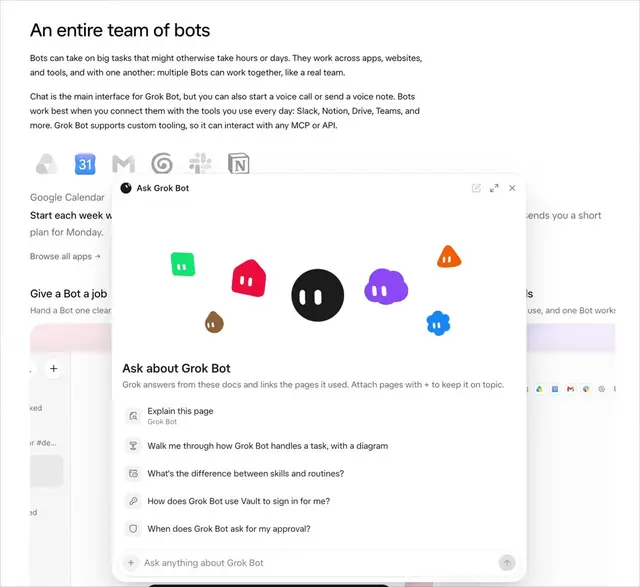
You can now ask Grok Bot questions inside its help docs
Grok Bot An AI teammate from SpaceXAI that has its own computer, connects to your apps, and can keep working on tasks for you.'s Docs Short for documentation: a product's official help pages explaining how its features work. site now has an 'Ask anything about Grok Bot' box, Eric Zakariasson of SpaceXSI posted on X at 01:28 MYT on 14 November. He says it answers from the docs, links the pages it used and can even draw a diagram of how a task runs.
What we learned
- Where to find it: the question box sits at the top of the Grok Bot overview page on docs.x.ai. Each answer links the help pages it drew on, so you can open the exact page and check.
- Zakariasson says it can also draw a diagram of how a task runs, which can help when you are planning a Routine A saved instruction that runs on a schedule or when something happens, even when you are away. with several steps.
- Also early on 14 November (MYT), the official @bot account posted that Grok Bot can join meetings. We covered that feature on 12 November; the live Changelog A dated list of what changed in each new version of an app, published by the company that makes it.'s newest entry is still version 1.0.1 from 11 November.
Why it matters: When a setting confuses you, ask the docs before guessing: answers come with links you can check. The answers are only as current as the docs, so very new features may not be covered yet.
Sources (3)
Was this useful?
Tap to vote. Hold, right-click or press Shift+Enter to add a reason or a note first.