1Highlight: Notion offline mode now saves up to 1,000 pages for you
2Users question their AI credits before the 2 Nov switch
3Smoother drag and drop for databases on mobile, in beta
4Notion API makes Markdown v2 the default and counts credits in decimals
5Notion Calendar teases a big update; a creator explains relations
Highlight of the day
Offline & mobile
1,000
recent and favourite pages saved offline on paid plans
★ Highlight of the day
Notion offline mode now saves up to 1,000 pages for you
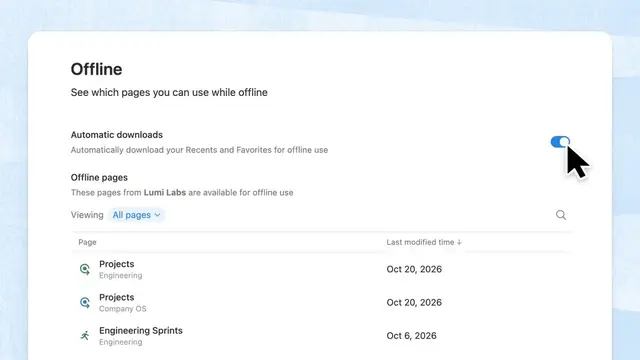
On 31 Oct 2026 (MYT), Notion said Offline mode A Notion setting that keeps copies of pages on your device so you can open them without internet. now downloads up to 1,000 of your recent and favourite pages on its own, on paid plans. Notion's post was short: "Your workspace shouldn't disappear when your WiFi does." It did not say which apps get it first, so check your own phone and laptop.
What we learned
Official (@NotionHQ): offline mode Auto Notion’s model router that picks which AI model to use for each task so you do not have to choose one yourself.-downloads up to 1,000 recent and favourite pages.
It is for paid plans, per Notion's post. Free plan users were not mentioned.
You don't have to mark each page for offline use one by one; recent and favourite pages are picked for you.
Tip: add the pages you need on the road to Favourites so they are more likely to be saved.
Why it matters: Clients who travel, work on site or have weak mobile data can keep reading and editing their key pages. Favourites now matter more.
Offline mode now auto-downloads up to 1,000 of your recent and favorite pages on paid plans · Notion (@NotionHQ)Read ↗
Was this useful?Tap to vote. Hold, right-click or press Shift+Enter to add a reason or a note first.
More stories today
AI credits
2 Nov
existing workspaces move to the new AI credits
Merged from 4 sources
AI credits
Users question their AI credits before the 2 Nov switch
Existing Notion workspaces move to the new AI credits on 2 Nov 2026, as Notion announced on 19 Oct. On Reddit's r/Notion, several users posted worries on 30 Oct. One said image work with a model they chose used about 1,822 credits in a single day, more than the 500 Select credits Notion AI credits used when you choose a specific AI model yourself, instead of letting Auto pick. a month they expect. Another worried their allowance could drop from about 25,000 to 2,000. These are users' own readings, not Notion's numbers.
Key learnings
Notion's help page lists 1,500 Standard credits Monthly Notion AI credits used when Notion’s Auto router picks the model for you. a month for Auto Notion’s model router that picks which AI model to use for each task so you do not have to choose one yourself. work and 500 Select credits for chosen models, and says amounts can vary by plan.
User concern: people who pick a model themselves, instead of Auto, may run out of Select credits much faster.
One Reddit post claims extra credits were charged without asking. We could not verify this, so treat it as one user's claim.
A YouTube explainer by Here's the Thing (@heresthethingmedia) tells of a Business user who, after trying Auto, looked at using their own ChatGPT plan instead.
Why it matters: Clients may see their AI limits change on Monday. Check the workspace's credit usage page now, and try Auto for everyday tasks before 2 Nov.
What Happened to Notion? · Here's the Thing (@heresthethingmedia)Watch ↗
Was this useful?Tap to vote. Hold, right-click or press Shift+Enter to add a reason or a note first.
Mobile apps
3
things improved: preview, haptics, animation
Merged from 2 sources
Mobile apps
Smoother drag and drop for databases on mobile, in beta
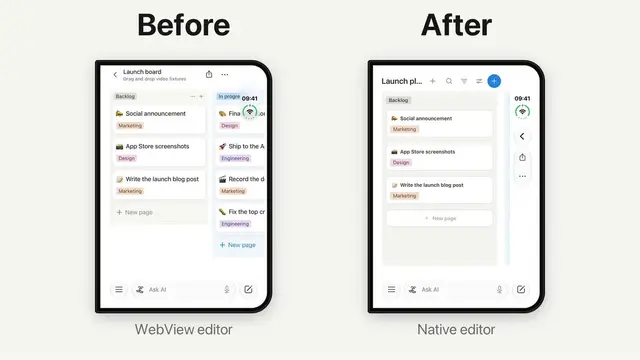
Ji Pei (@iampgzp), a Notion engineer according to his X profile, posted on 31 Oct 2026 (MYT) that dragging and dropping in Notion databases is better on mobile. He said the preview, the haptics (small phone vibrations) and the animation all improved. Notion shared his post. For now it is in Notion's beta program.
Key learnings
What changed, per Ji Pei: a clearer preview while you drag, better haptics, and smoother animation.
It is in the beta program, so most users may not see it yet.
Notion's own post called it "Improved drag and drop on mobile".
Neither post gave a date for the full release.
Why it matters: Moving cards on a phone, like in a task board, has been fiddly. This helps teams who update boards on the go.
Better Drag and Drop in notion database · Ji Pei (@iampgzp)Read ↗
Improved drag and drop on mobile! · Notion (@NotionHQ)Read ↗
Was this useful?Tap to vote. Hold, right-click or press Shift+Enter to add a reason or a note first.
Developers
~3 months
after deprecation before Markdown v1 retires
Developers
Notion API makes Markdown v2 the default and counts credits in decimals
Notion's developer changelog for 30 Oct 2026 lists three changes. In the next API version, Notion-flavored Markdown v2 becomes the default and v1 is deprecated. Data sources can now store sync details. And the Notion Agent Notion’s built-in AI assistant that can read your workspace, answer questions, and take actions you approve. APIs now report credits with decimals instead of whole numbers.
Key learnings
On the next API version, requests that ask for Markdown v1 will get an error (400). Notion says v1 retires about 3 months later and dates will be announced at least 3 months ahead.
The official JavaScript library, @notionhq/client v5.29.0, adds a markdown_version option.
credits_used now shows up to 2 decimals, rounded down (12.456789 shows as 12.45).
total_credits_used is a whole number from 1 upward, and below 1 it shows 2 significant figures (0.456789 shows as 0.45).
Why it matters: Anyone with scripts or integrations that read or write Notion pages as Markdown should plan a test on v2 now, before v1 stops working.
Notion API changelog (30 Oct 2026) · Notion DevelopersRead ↗
Was this useful?Tap to vote. Hold, right-click or press Shift+Enter to add a reason or a note first.
Calendar & creators
4 views
day, week, month and agenda in the iOS rebuild
Merged from 2 sources
Calendar & creators
Notion Calendar teases a big update; a creator explains relations
On 30 Oct 2026 (MYT), the Notion Calendar account replied to a user who said the app had issues for over a week. It said a "huge update" is "coming very very soon" and shared an early-access link, quoting its September preview of the rebuilt iOS app. Separately, creator Kat Waugh (@itskatwaugh) posted a beginner tutorial on database relations and Rollup A Notion database property that pulls in and sums up information from related pages in another database.. That video is her own teaching, not Notion news.
Key learnings
Official (@NotionCalendar): a big update is coming soon, with early access offered to those who want to try it.
The quoted September post showed a native iOS rebuild with day, week, month and agenda views.
Kat Waugh's video covers one-way and two-way relations, relations inside the same database, and rollup limits.
Credit: via Kat Waugh (@itskatwaugh) on YouTube. Her description includes affiliate links and says it is not sponsored.
Why it matters: Clients unhappy with Calendar on iPhone may not have long to wait. Relations and rollups remain the top question in beginner workshops.
 Offline & mobile