1Highlight: Notion Agents can now search, read and edit your Google Drive files
2New AI credits run out fast, some Notion users report
3Notion email says your old account will be deleted? Check first
4A travel agent runs 500 trips a year in Notion
Highlight of the day
New feature
2
access levels: Limited or Full
Merged from 2 sources
★ Highlight of the day
Notion Agents can now search, read and edit your Google Drive files
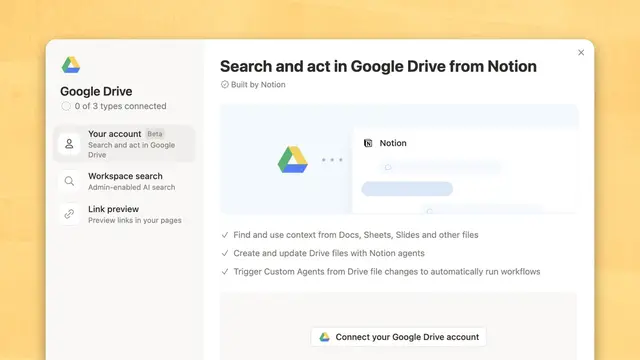
On 4 Nov 2026 (MYT), Notion's official X account said Notion Agent Notion’s built-in AI assistant that can read your workspace, answer questions, and take actions you approve. can now use Google Drive. Per Notion's help page, the feature is in beta and lets Notion Agent and Custom Agent A Notion AI agent you set up with its own instructions, tools and triggers to run a recurring job for your team. search, read, create and update Drive files without leaving Notion. You switch it on in Settings, then Connections, then Google Drive.
What we learned
Notion says the agent checks your Drive live and nothing is saved or indexed by Notion. It can only see files you own, files shared with you and Shared drive A Google Drive space owned by a team rather than one person, so files stay when someone leaves. you can access.
You pick Limited access (it reads your files but only edits files it made or you chose) or Full access (it can edit anything you can edit).
Custom Agents can be limited to certain folders or shared drives. Notion Agent always uses your full access level.
Your Google Workspace admin may need to approve it first. Notion also suggests naming Google Drive in your prompt when you want the agent to use it.
Why it matters: If your team keeps documents in Google Drive, agents can now work with them directly. Start with Limited access so the agent can't change files you didn't pick.
Your Notion Agents can now use Google Drive · Notion (@NotionHQ)Read ↗
Connect your agents to Google Drive (beta) · Notion Help CenterRead ↗
Was this useful?Tap to vote. Hold, right-click or press Shift+Enter to add a reason or a note first.
More stories today
AI credits
1,500
credits one user says a single task used
Merged from 5 sources
AI credits
New AI credits run out fast, some Notion users report
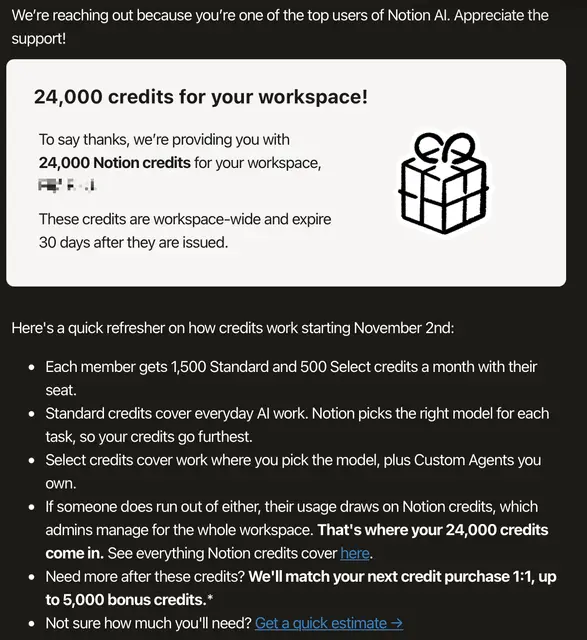
Since the new AI credits reached existing workspaces on 2 Nov, several Notion users on Reddit say their credits are running out faster than expected, especially on Auto Notion’s model router that picks which AI model to use for each task so you do not have to choose one yourself.. One user also shared an email, which he says came from Notion, giving 24,000 bonus credits to a top Notion AI user's workspace. These are users' own reports, not Notion figures.
Key learnings
u/1blindspot says a simple page-size change on Auto cost 36 credits. u/Advanced-Gene1287 says one task reviewing about 60 documents used all 1,500 of his Standard credits Monthly Notion AI credits for work where Notion picks the model for you..
u/okayladyk says credits were used on days she avoided Notion Agent Notion’s built-in AI assistant that can read your workspace, answer questions, and take actions you approve., and asks whether Autofill A Notion AI database property that fills in each row for you, such as a summary. counts. Notion's help page says database autofill does not currently reduce your credit balance.
u/Jjsskkj asks Notion to raise the 500 Select credits Monthly Notion AI credits for work where you pick the model yourself, or use a Custom Agent you set up., show the cost per model and let people choose which pool to spend from.
u/Existing-Exchange303 posted the bonus email: 24,000 workspace credits that expire after 30 days. He thinks Notion knows users don't like the new system.
Why it matters: Check Settings, then Notion AI, then Usage after a big task to see what it cost. Split large jobs into smaller steps before letting an agent loose on dozens of documents.
Got gifted 24k AI Credits · u/Existing-Exchange303 on r/NotionRead ↗
Burned 1500 credits in one task · u/Advanced-Gene1287 on r/NotionRead ↗
Notion says Complex on auto is 25: a simple task just cost me 36 · u/1blindspot on r/NotionRead ↗
Credits get used in your sleep!? · u/okayladyk on r/NotionRead ↗
Let's stop paying Notion until they address the AI credit limits · u/Jjsskkj on r/NotionRead ↗
Was this useful?Tap to vote. Hold, right-click or press Shift+Enter to add a reason or a note first.
Account safety
30 days
notice Notion's policy promises, not 7
Merged from 2 sources
Account safety
Notion email says your old account will be deleted? Check first
A Reddit user shared an email titled "Action needed: Log in to keep your Notion account" and asked if it is a scam. It says free accounts unused for five years will be deleted on 10 Nov 2026. Notion does have a policy like this, but its help page says owners get 30 days' notice, while this email gives 7 days. We could not confirm whether the email is real.
Key learnings
Notion's policy covers free accounts with no login and no edits for five years. Paid, organisation-managed and multi-user workspace owner accounts are not deleted.
Per the help page, logging in during the notice period keeps the account, and support can restore a deleted account within 30 days.
The email's 7-day deadline doesn't match the 30 days on the help page, so treat it with care.
Safest step: don't click the email's link. Open notion.com yourself and log in there.
Why it matters: Emails that rush you to log in are a common phishing trick. Going to the site yourself keeps your account safe either way.
Notion dormant account policy · Notion Help CenterRead ↗
Was this useful?Tap to vote. Hold, right-click or press Shift+Enter to add a reason or a note first.
Use case
500
trips a year in one Notion setup
Use case
A travel agent runs 500 trips a year in Notion
Reddit user u/tryst88, who says he has worked in travel for about 10 years, shared how his business runs trips, money and daily tasks in Notion. Each trip is a project that holds the families' requests, supplier bookings, invoices and payments. This is his own setup, not a Notion template.
Key learnings
Each trip works like a spreadsheet row you can open to see every detail behind it.
He matches bank records and invoices to each trip, so he can see a profit and loss for every trip and spot which ones earn more.
Tasks sit next to each trip, with deadlines and the colleague responsible, so a departure review shows what is still missing.
WhatsApp updates are still typed in by hand because personal and work chats are mixed. He uses n8n An automation tool that links apps together so data moves between them without manual copying. with Notion to record and process documents.
Why it matters: Any small business that sells projects, such as tours, events or renovations, can copy this one-project-per-job pattern to see which jobs actually make money.
 New feature