1Highlight: Notion shares seven community setups that pair Notion with AI tools
2Shared Custom Agents now spend their owner's Select credits by default
3A creator builds the same CRM in Claude Code and Notion
4How to connect Claude to Notion and limit what it can change
Highlight of the day
Community setups
7
community setups in Notion's thread
Merged from 4 sources
★ Highlight of the day
Notion shares seven community setups that pair Notion with AI tools
On 3 Nov 2026, Notion's official X account posted a thread of seven setups people built by connecting Notion to AI tools such as Claude, ChatGPT and Wispr, and even a Fitbit. They range from a household shopping manager to a one-person newsletter. Each one is the creator's own setup, shared on X, not a Notion feature.
What we learned
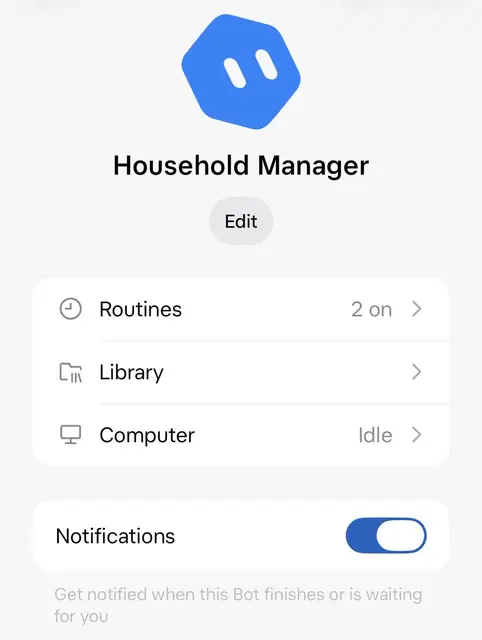
Household manager, via duck says (@ducksays) on X: an AI agent read a year of Walmart orders (78 orders, about RM19,040 or US$4,693), built a product list in Notion and drafts the shopping cart every Sunday. It also tracks warranties and filter changes. He says it forgot soap in week one.
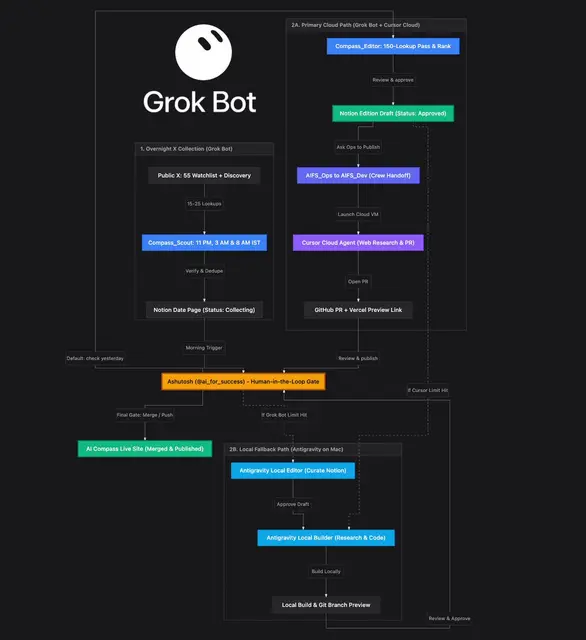
One-person newsroom, via Ashutosh Shrivastava (@ai_for_success) on X: one agent collects AI news into Notion pages three times a night and marks what is confirmed or not. Another drafts the newsletter and waits for his approval before anything is published.
Brain dump to video, via Ryan (@ryangrowthh) on X: he dictates ideas with Wispr into a Notion database, sketches them, then films and edits with AI tools. Others in the thread log Fitbit workouts into Notion (@davidlloayza), or talk a plan through with ChatGPT and save the summary to Notion (@donau70).
Notion asked readers to reply with their own setups for a follow-up next week.
Why it matters: Most of these keep a person in charge: the agent drafts and the human approves. That's a safe pattern to copy if you are starting with agents.
Here are 7 setups worth stealing · Notion (@NotionHQ)Read ↗
AI household manager built on Notion · duck says (@ducksays)Read ↗
One-person AI newsroom in Notion · Ashutosh Shrivastava (@ai_for_success)Read ↗
Brain dump to finished video · Ryan (@ryangrowthh)Read ↗
Was this useful?Tap to vote. Hold, right-click or press Shift+Enter to add a reason or a note first.
More stories today
AI credits
500
Select credits per member a month
Merged from 2 sources
AI credits
Shared Custom Agents now spend their owner's Select credits by default
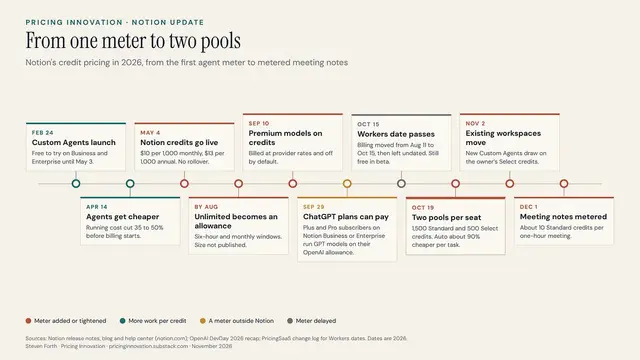
Notion's help page now says a Custom Agent A Notion AI agent you set up with its own instructions, tools and triggers to run a recurring job for your team. uses its owner's Select credits Monthly Notion AI credits for work where you pick the model yourself, or use a Custom Agent you set up. by default, even when the agent is shared with a team. A workspace owner can instead give an agent its own monthly budget of shared Notion credits A shared, paid balance an admin manages, used when members run out or for workspace-funded agents.. Pricing writer Steven Forth flagged the change on his Substack on 2 Nov.
Key learnings
If you build an agent your whole team uses, their runs can use up your own 500 monthly Select credits.
An owner can fund busy team agents from workspace Notion credits, with a budget and spending limits for each agent.
Forth says agents made before the change keep using shared workspace credits. That is his reading, so check each agent's settings.
He also notes a simple task costs about 5 credits on Auto Notion’s model router that picks which AI model to use for each task so you do not have to choose one yourself. versus about 50 when you pick a top model. Extra credits are still US$10 per 1,000 (about RM40.57).
Why it matters: If you own a popular team agent, you could run out of Select credits early in the month. Ask your admin to fund it from workspace credits.
Standard, Select & Notion credits: eligible features · Notion Help CenterRead ↗
Notion pricing update · Steven Forth (Pricing Innovation)Read ↗
Was this useful?Tap to vote. Hold, right-click or press Shift+Enter to add a reason or a note first.

Use case
2
versions of the same CRM
Use case
A creator builds the same CRM in Claude Code and Notion
YouTuber George Vlasyev built one sales CRM Customer relationship management: a system for tracking customers, contacts and sales deals. twice: once as a custom app with Claude Code Anthropic's AI tool that writes and edits software for you from plain-language requests., and once as a Notion setup with Companies, Contacts, Deals and an Activity Log. He tested notes, follow-ups and deal stages in both. This is his comparison, not official guidance.
Key learnings
The Claude Code version was quick to build and easy to shape exactly how he wanted.
But a custom app runs locally in a browser, so you still need to sort out shared data, logins and backups.
The Notion version is less flexible, but a team can share it, keep using it and hand it over.
His question: do you want a first version fast, or a system other people can maintain?
Why it matters: Building your own tool with AI is easy now. Keeping it running is the hidden cost, so pick shared tools for anything your team relies on.
Claude vs. Notion: I Built the Same CRM Twice · George Vlasyev (@GeorgeVlasyev)Watch ↗
Was this useful?Tap to vote. Hold, right-click or press Shift+Enter to add a reason or a note first.

Tips
3
permission levels for each tool
Merged from 2 sources
Tips
How to connect Claude to Notion and limit what it can change
Tom Nassr of the automation firm XRAY published a short guide and video on linking Claude to Notion with Notion's official connector. He says it works on Claude's free plan and takes about two minutes. His main advice is to set Tool permission A setting that decides whether an AI can use a given action freely, only with your OK, or not at all. straight after connecting.
Key learnings
Pick the official Notion connector with the verified tick. Search also shows community plugins.
The workspace you choose during sign-in decides what Claude can read, so don't connect one you want kept private.
Each tool can be set to Always allow, Needs approval or Blocked.
His setup: let reads run freely, make edits wait for your OK, and block deletes.
Why it matters: Then you can ask "what's due this week?" in plain English, and Claude can't change anything without your OK.